Navigating the Security Tools Landscape from the Frontlines
Why Tool Selection Is Harder Than Vendor Marketing Suggests
When I became CTO responsible for healthcare AI systems across four African countries, I quickly learned that the AI security tools landscape looks very different in practice than it does in vendor presentations.
The challenge isn’t just choosing between Splunk and Azure Sentinel, or deciding whether to use CrowdStrike or Defender. The real challenge is understanding which tools will actually work in your specific environment—with your infrastructure constraints, your team’s capabilities, your budget realities, and your regulatory requirements.
Most AI security tool comparisons assume you’re operating in stable, well-resourced environments with reliable connectivity, consistent power, and skilled security teams. They assume you can afford enterprise licensing and have the infrastructure to support always-on monitoring.
That wasn’t my reality.
Managing healthcare AI systems processing sensitive patient data across Ghana, Nigeria, Kenya, and Egypt taught me that tool selection requires a fundamentally different framework when you’re operating outside Silicon Valley or London. I learned this through expensive mistakes, failed implementations, and the occasional middle-of-the-night crisis when a “cloud-native” tool couldn’t handle regional internet outages.
This pillar shares what I learned—not from reading vendor whitepapers, but from actually implementing, troubleshooting, and living with these tools in challenging environments. Whether you’re managing AI systems in resource-constrained settings, working with distributed teams, or simply trying to cut through the marketing noise, these lessons apply.
The Reality of AI Security Tools: Two Critical Categories
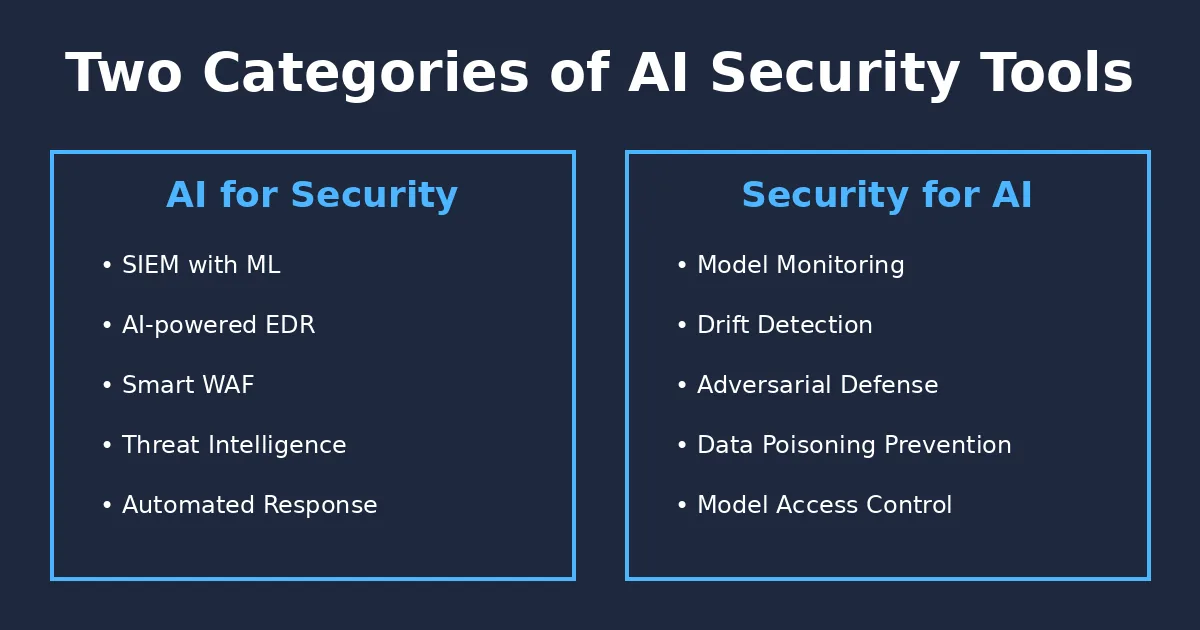
Before diving into specific tools, it’s essential to understand that “AI security tools” actually encompasses two fundamentally different categories:
Category 1: AI-Powered Security Tools
These are traditional cybersecurity tools enhanced with AI capabilities. Think SIEM platforms using machine learning for threat detection, or AI-powered vulnerability scanners that can identify zero-day exploits.
Examples from my deployments:
- Azure Sentinel: Used machine learning to detect unusual access patterns across our multi-country infrastructure
- CrowdStrike Falcon: Leveraged AI for endpoint threat detection and response
- Cloudflare WAF: Employed AI models to identify and block emerging attack patterns
These tools use AI to make traditional security better, faster, and more automated.
Category 2: Security Tools for AI Systems
These are tools specifically designed to secure AI/ML systems themselves. They address unique AI risks like model theft, data poisoning, adversarial attacks, and model drift.
Examples from my healthcare platforms:
- Custom drift monitoring: Statistical tools to detect when our diabetes prediction models started degrading
- WhyLabs: Lightweight monitoring for ML model behavior in production
- Weights & Biases: Tracking model lineage and experiment security
These tools secure the AI itself—protecting models, training data, and ML pipelines from AI-specific threats. The critical insight: You need both categories. Traditional security tools won’t catch model drift or data poisoning. AI-specific tools won’t stop ransomware or phishing attacks.
My 6-Factor Tool Selection Framework
After evaluating dozens of tools and implementing security across four countries with vastly different infrastructure realities, I developed a practical framework for tool selection. This isn’t theoretical—this is what actually determined whether a tool succeeded or failed in production.
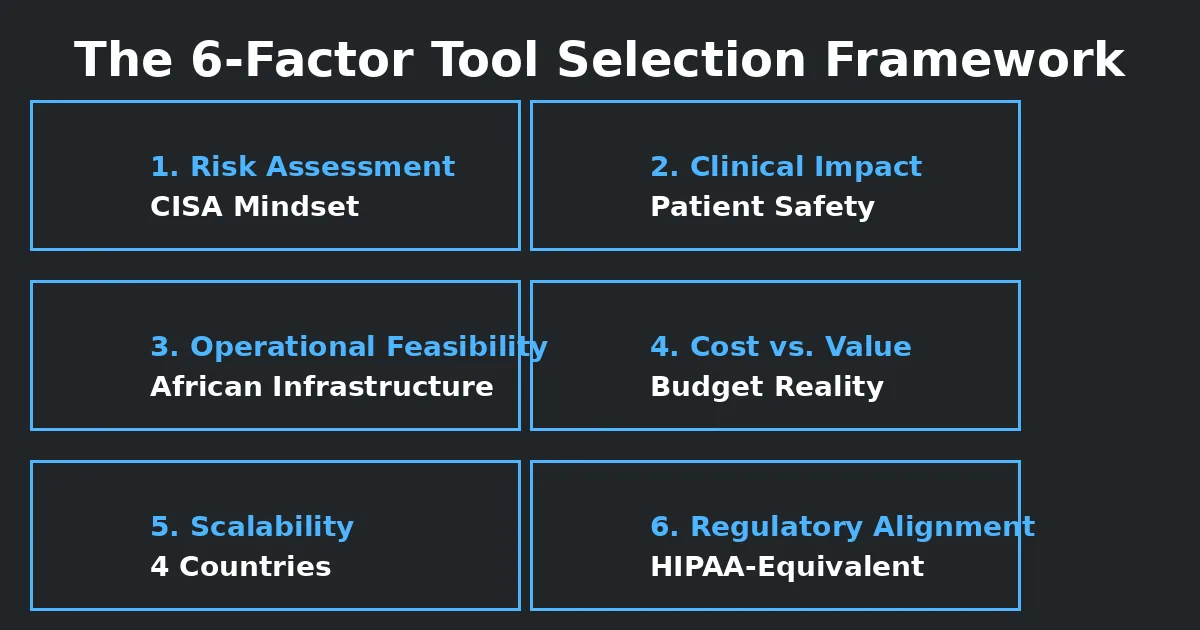
Factor 1: Risk Assessment (The CISA Mindset)
My CISA certification fundamentally shaped how I evaluate tools. I always start with:
What specific risk does this tool mitigate?
- Model theft? Data poisoning? Unauthoried access? Model drift?2. Is this risk critical, high, medium, or low for my specific AI systems?3. What’s the potential impact if this risk materializses?
Example: When evaluating model monitoring tools, I asked, “What’s the clinical impact if our diabetes prediction model drifts and we don’t catch it?” The answer—potentially dangerous medical advice—made drift detection non-negotiable, even with a limited budget.
Factor 3: Operational Feasibility in Africa
This is where most vendor recommendations fell apart:
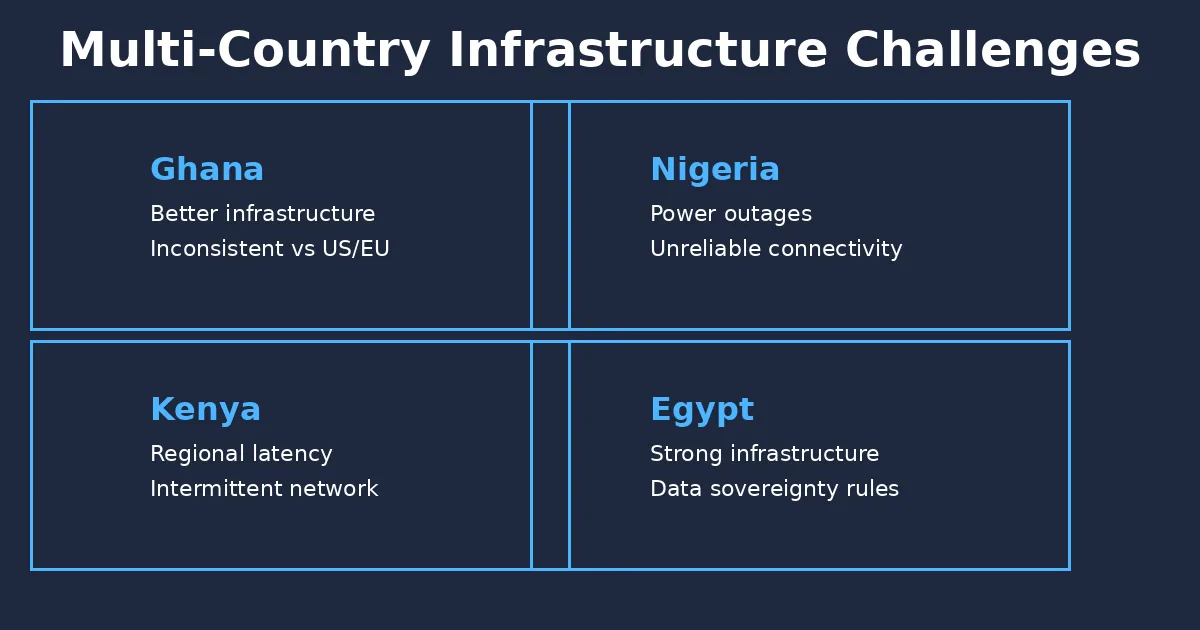
Infrastructure realities I had to account for:
- Nigeria: Frequent power outages, unreliable internet connectivity- Kenya: Regional cloud latency, intermittent network availability- Ghana: Better infrastructure but still inconsistent compared to US/EU- Egypt: Strong infrastructure but strict data sovereignty requirements
The tool had to work with:
- Intermittent connectivity (tools requiring always-on streaming failed)- Limited bandwidth (heavy vulnerability scanners overwhelmed networks)- Variable power supply (tools requiring constant updates didn’t work)- Regional cloud presence (or offline capability)
Example of failure: A sophisticated SIEM requiring constant data streaming worked beautifully in our Ghana deployment. In Nigeria, it failed within weeks due to connectivity issues. We switched to ELK Stack with local logging and periodic batch uploads—less elegant, more reliable.
Factor 5: Scalability Across Countries
Operating in four countries meant tools needed to:
- Support multiple regulatory frameworks simultaneously
- Handle different data residency requirements
- Work across varying infrastructure quality
- Scale from small clinics to larger healthcare facilities
- Adapt to different team skill levels
What worked: Cloud-native tools with regional deployment options (Azure, AWS) that could adapt to each country’s requirements. What didn’t work: Rigid enterprise tools assuming homogeneous infrastructure and consistent connectivity.
Factor 2: Clinical/Business Impact Analysis
For healthcare AI, every tool decision could affect patient safety:
Questions I asked:
If this tool fails, what happens to patient care? Does this tool protect patient data adequately? Will this tool’s alerts help us make better clinical decisions? Could false positives from this tool cause alert fatigue and missed real issues?
Real example: I rejected a sophisticated SOAR platform that would have automated too many security responses. In healthcare, you can’t automate patient data decisions without physician oversight. The tool’s strength became a liability.
Factor 4: Cost vs. Value Analysis
With limited budgets serving patients across emerging markets, every dollar mattered:
My approach:
- Calculate Total Cost of Ownership (licensing + infrastructure + training + maintenance)- Prioritize the controls with the highest risk reduction per dollar spent- Favour tools that solve multiple problems over point solutions- Consider open-source alternatives seriously- Avoid vendor lock-in wherever possible
Practical example: Azure Sentinel cost more than ELK Stack, but provided better multi-cloud visibility, required less maintenance, and scaled more reliably. For our Ghana and Egypt operations with stable connectivity, Sentinel was worth it. For Nigeria and Kenya, ELK Stack’s lower resource requirements and offline capability made it the better choice.
Factor 6: Regulatory Alignment
Even though we operated primarily in African markets, I implemented HIPAA-equivalent controls because:
- Our patients deserved data protection regardless of local laws- We planned for potential US/EU partnerships- Strong data protection builds trust with healthcare providers
Non-negotiable requirements:
- Encryption at rest and in transit- Comprehensive audit logging- Role-based access control (RBAC)- Clear data residency options- No data leaving country borders without explicit controls
Example: I rejected one promising AI monitoring tool because it required sending model telemetry to US servers with no data residency controls. In healthcare, that’s simply not acceptable.
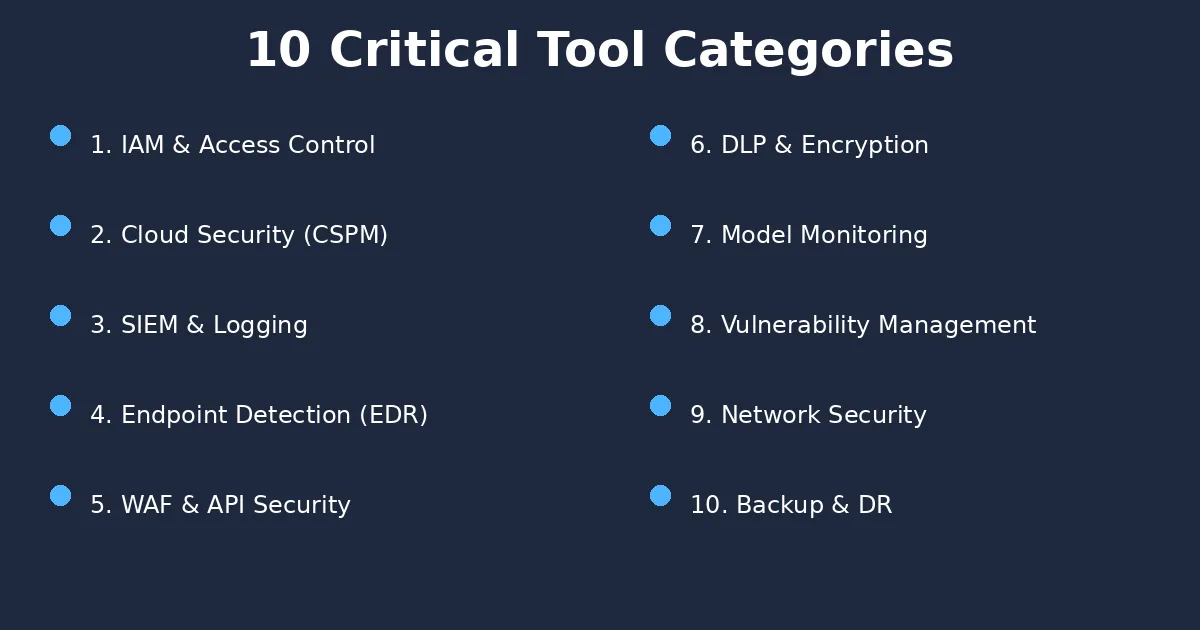
The 10 Critical Tool Categories: My Field-Tested Recommendations
Based on securing healthcare AI systems across four countries, here’s my breakdown of essential tool categories—with honest assessments of what actually worked.
1. Identity & Access Management (IAM)
What I deployed:
Azure AD with MFA (primary): Worked reliably across all countries, good mobile app support Okta (select teams): Excellent for contractor management and third-party access
Why IAM came first: The foundation of AI security is controlling who can access what. Before worrying about sophisticated model monitoring, I locked down access to training data, model endpoints, and production systems.
Key lesson: Even the most sophisticated AI security tools fail if unauthorized users can access your systems. Start with strong IAM—everything else builds on this. For resource-constrained environments: Azure AD’s free tier provides solid basic IAM. Add MFA universally before investing in anything else.
2. Cloud Security Posture Management (CSPM)
What I deployed: Azure Security Center (primary cloud provider)AWS Security Hub + GuardDuty (hybrid deployments) Why this mattered:
With AI infrastructure spanning multiple cloud providers and regions, I needed continuous visibility into misconfigurations, exposed storage, and compliance drift. Real example: Azure Security Center alerted us to a misconfigured storage container that would have exposed patient medical images. The alert came 20 minutes after the misconfiguration—before any data leaked. For multi-cloud environments: Accept that you’ll need multiple tools. Focus on getting each cloud provider’s native CSPM working well rather than chasing a perfect unified visibility.
3. Security Information & Event Management (SIEM)
What I deployed: Azure Sentinel (Ghana, Egypt): Advanced threat detection, good machine learning capabilitiesELK Stack (Nigeria, Kenya): Reliable local logging, lower resource requirements The split deployment taught me: sophisticated doesn’t always mean better. Sentinel’s ML-powered threat detection was valuable in stable environments. In Nigeria and Kenya, ELK Stack’s ability to function with intermittent connectivity and lower bandwidth requirements made it more reliable. Key capabilities I needed: Centralized logging across distributed systems Real-time alerting for critical security events Historical analysis for compliance and investigation Integration with cloud infrastructure Biggest mistake: Initially trying to use a single SIEM across all four countries. Infrastructure realities required different solutions in different regions. For small teams: Start with cloud-native SIEM (Azure Sentinel, AWS Security Hub) if you have reliable connectivity. They require less maintenance than self-hosted solutions.
4. Endpoint Detection & Response (EDR)
What I deployed: CrowdStrike Falcon (infrastructure-level protection) Microsoft Defender for Cloud (integrated protection) Why EDR mattered for AI systems: Healthcare AI workstations accessing patient data and model training infrastructure needed protection from ransomware, malware, and software. Real incident: CrowdStrike caught a cryptomining malware infection on a data scientist’s workstation before it could spread to training infrastructure. The AI-powered behavioral detection identified the threat within minutes. For AI teams specifically: EDR is critical because data scientists often need elevated privileges and install diverse software packages. This increases the attack surface significantly.
5. Web Application Firewall (WAF) & API Security
What I deployed: Cloudflare WAF (primary protection) Azure WAF (secondary layer) Why this was non-negotiable: Our healthcare platforms served patients through web and mobile interfaces. These public-facing applications were constant targets for: Credential stuffing attacksSQL injection attemptsDDoS attacksAPI abuse Cloudflare specifically: Their edge network performed exceptionally well in Africa. By blocking attacks at the edge (before traffic reached our servers), we saved bandwidth and improved performance—both critical with limited infrastructure. Key lesson: For AI systems exposed through APIs, WAF and API security aren’t optional. Every model endpoint needs protection from abuse, enumeration attacks, and data extraction attempts.
6. Data Loss Prevention (DLP) & Encryption
What I deployed: Microsoft Purview (data classification and lifecycle management) Azure Key Vault / AWS KMS (encryption key management) Vormetric (encryption for sensitive healthcare data stores) The healthcare context: Patient data is the most sensitive asset in healthcare AI. Every model trained on patient records, every prediction made, every data point collected needed encryption and DLP controls. My approach: Classify all data (public, internal, confidential, patient) Encrypt everything at rest and in transit Monitor for unauthorised data movement Log all access to patient records Critical implementation detail: Encryption can’t be an afterthought. We designed data pipelines with encryption from day one. Retrofitting encryption later would have been exponentially harder. For AI specifically: Training data and model artifacts need the same protection as production patient data. Protect your models—they encode sensitive patterns from training data.
7. AI Model Monitoring & Drift Detection
What I deployed: Custom statistical monitoring scripts (primary method)WhyLabs (early evaluation) Weights & Biases (experiment tracking and model versioning) The harsh reality: This category had the biggest gap between marketing promises and actual capability. Most “AI observability” platforms assumed: Large, sophisticated data science teams Abundant compute resources Constant connectivity for real-time monitoring Willingness to send model telemetry to external servers What actually worked: Simple, reliable statistical monitoring: Periodic ground truth validation against physician assessments Statistical drift detection on prediction distributions Manual sampling and physician review Version control for all model changes Example: For our diabetes prediction model, we tracked: Distribution of risk scores (are we suddenly predicting more high-risk patients?) Confidence intervals (is the model becoming less certain?) Prediction-to-outcome ratios (when physicians could follow up, did predictions match?) The tool I rejected: One sophisticated ML monitoring platform required sending detailed model telemetry to US-based servers. For healthcare in Africa, data sovereignty concerns made this unacceptable—regardless of vendor assurances. For resource-constrained environments: Build simple statistical monitoring first. Get fancy only after you have reliable basics working.
8. Vulnerability Management & Penetration Testing
What I deployed: Tenable Nessus (vulnerability scanning)OWASP ZAP (web application testing) Quarterly third-party penetration testing Why regular testing mattered: AI systems introduce new attack surfaces: Model APIs that could leak training data Jupyter notebooks with embedded credentialsML pipelines with elevated privileges Data preprocessing systems handling sensitive information Key lesson from a pentest: A third-party assessment discovered our model API would accept unlimited queries without rate limiting. An attacker could have extracted training data patterns through thousands of carefully crafted queries. We immediately implemented rate limiting and query monitoring. For AI systems specifically: Standard vulnerability scanners miss AI-specific risks. We supplemented automated scanning with: Manual review of model endpoints for data leakage Testing for adversarial robustness Reviewing training pipelines for injection vulnerabilities
9. Network Security & Micro-Segmentation
What I deployed: Azure Network Security Groups (network segmentation) Cloudflare Zero Trust (excellent performance in Africa) Network traffic analysis and monitoring The security principle: Assume breach. Even with strong perimeter security, segment networks so compromised systems can’t access everything. My implementation: Separate networks for: patient-facing applications, internal systems, model training infrastructure, administrative access Strict firewall rules between segments Zero trust principles: verify every access request Real benefit: When we detected suspicious activity on one system, network segmentation prevented lateral movement. The potential breach was contained to a single network segment. For AI specifically, Training infrastructure often needs high-bandwidth access to data storage. Design network segmentation that allows necessary data flow while preventing unauthorised access.
10. Backup, Disaster Recovery & Business Continuity
What I deployed: Automated encrypted backups (Azure Backup, AWS S3 with versioning) Cross-region replication (protecting against regional failures) Regular recovery testing (quarterly restore drills) Why this saved us: Operating across four countries with varying infrastructure stability meant systems would fail. The question wasn’t “if” but “when.” Real incident: A power surge in our Nigeria location corrupted local storage. Because we had automated backups replicating to Azure, we restored full operations within 4 hours. Without backups, we would have lost weeks of patient interaction data. Critical lesson: Backups without tested restore procedures are useless. We tested disaster recovery quarterly—actually restoring systems from backup in isolated environments. For AI systems: Back up everything: training data, model artifacts, training scripts, configuration files, and experiment results. Model training is expensive—protect that investment.
Implementation Reality: Making Tools Work with Small Teams
Most AI security tool documentation assumes you have a dedicated security operations center with skilled analysts. My reality was different: small teams, multiple responsibilities, limited security expertise.
Here’s what actually worked:
Prioritize Automation Over Dashboards
The mistake: Implementing tools with beautiful dashboards that required constant monitoring.
What worked: Tools that sent push notifications for critical events. I couldn’t sit watching security dashboards—I needed tools that alerted me when action was required.
Example: Azure Sentinel’s automated incident response reduced alert noise by 70%. Instead of investigating every anomaly, the system automatically handled low-severity events and escalated only what needed human attention.
Accept “Good Enough” Over “Perfect” The insight: Perfect security is impossible, especially with limited resources. The goal is risk reduction, not risk elimination. My approach:
- Identify critical risks (patient data exposure, model manipulation, system compromise)2) Implement strong controls for critical risks3) Accept residual risk for lower-priority concerns4) Document everything for future improvement
Example: I couldn’t afford sophisticated adversarial testing for our AI models. Instead, I implemented strong input validation, rate limiting, and monitoring. Not perfect, but practical given resources.
Leverage Managed Services Aggressively
The reality: Maintaining self-hosted security tools requires significant ongoing effort.
My choice: Cloud-native security services (Azure Security Center, AWS GuardDuty, Cloudflare) reduced operational burden dramatically. Yes, they cost more than open-source alternatives. But they required far less maintenance time.
When self-hosting made sense:
- ELK Stack in locations where cloud connectivity was unreliable
- Custom monitoring where no good managed solution existed
- Open-source tools where licensing costs were prohibitive
Build Security Into Workflows, Not Alongside Them
The failure pattern: Implementing security tools that required extra steps, extra logins, extra approvals.
What worked: Integrating security directly into existing workflows:
- Security scanning in CI/CD pipelines (not separate processes)
- IAM using existing Azure AD credentials (not separate security logins)
- DLP policies applied automatically (not requiring manual classification)
Result: Security happened by default, not as optional extra work.
The Honest Assessment: Overrated vs. Underrated Tools
After years implementing AI security tools across challenging environments, here are my unvarnished opinions:
Overrated: Enterprise SOAR Platforms (for African Markets)
The promise: Automated security orchestration, playbook-driven incident response, unified security operations. My experience: Beautiful in demos, problematic in practice. Why they failed:
- Required constant tuning and maintenance
- Generated too many false positives
- Automated responses inappropriate for healthcare contexts
- Expensive licensing for functionality we didn’t fully utilize
Better alternative: Focused SIEM with custom alerting and simple automated responses for well-understood threats.
Underrated: ELK Stack
Why it’s often dismissed: Perceived as “old tech,” less sophisticated than modern SIEM platforms.
Why it worked brilliantly:
- Reliable in intermittent connectivity environments
- Lower resource requirements
- Flexible log parsing and analysis
- Open source with strong community support
- Stable and predictable
Real value: In Nigeria and Kenya, ELK Stack’s reliability made it more valuable than sophisticated alternatives that couldn’t handle infrastructure constraints.
Overrated: Complex MLOps Platforms (for Small Teams)
The promise: End-to-end machine learning lifecycle management, automated pipelines, governance workflows.
My experience: Overkill for lean teams, more overhead than value.
Why they didn’t fit:
- Required dedicated platform engineering
- More complex than our ML workflows needed
- Expensive infrastructure requirements
- Steep learning curves
Better approach: Lightweight tools (Weights & Biases for experiment tracking, simple scripts for monitoring, manual governance with clear documentation).
Underrated: Cloudflare Zero Trust
Why it’s often overlooked: Cloudflare is known for CDN and DDoS protection, less for security architecture. Why it excelled in Africa:
- Exceptional performance across African markets
- Reliable even with challenging connectivity
- Reduced bandwidth costs by blocking threats at edge
- Affordable compared to enterprise alternatives
- Simple to implement and maintain
Real impact: Improved application performance while simultaneously improving security—a rare combination.
Overrated: All-in-One Security Suites
The promise: Single vendor, unified platform, seamless integration.
My experience: Vendor lock-in, paying for features you don’t use, “jack of all trades, master of none” problem.
Better approach: Best-of-breed tools for each category, accepting some integration complexity in exchange for better individual capabilities.
Underrated: WhyLabs (for Lightweight ML Monitoring)
Why it’s not widely known: Smaller vendor, less marketing than enterprise platforms.
Why it worked well:
- Lightweight monitoring without heavy infrastructure
- Privacy-preserving (statistical summaries, not raw data)
- Focused on practical ML monitoring problems
- Reasonably priced
- Simple to implement
Perfect fit: When you need model monitoring but don’t have resources for sophisticated ML observability platforms.
The GenAI Security Challenge: New Risks, Inadequate Tools
Operating healthcare AI systems during the GenAI explosion (ChatGPT, LLMs, RAG systems), I discovered that traditional AI security tools don’t address generative AI risks adequately.
New Risks GenAI Introduced:
1- Prompt Injection Attacks: Users crafting prompts to manipulate model behavior, bypass safety controls, or extract training data.2- Hallucinations with Real-World Consequences: In healthcare, an LLM confidently providing incorrect medical information could harm patients.3- Data Leakage Through Embeddings: Vector databases and RAG systems potentially exposing sensitive training data through semantic search.4- Jailbreaking and Safety Bypass: Techniques to circumvent model safety guardrails and extract inappropriate or dangerous responses.5- Model Extraction and Theft: Sophisticated attacks to reconstruct proprietary models through API access.
Current Tool Gaps:
What’s missing:
- Effective prompt injection detection
- Real-time hallucination detection for domain-specific applicationsRAG pipeline security monitoring
- Tools for securing vector databases
- Practical jailbreak prevention
What exists but needs maturity:
- LLM firewalls (early stage, often too restrictive or too permissive)
- Content moderation (better than nothing, but misses subtle risks)
- Basic input/output filtering (necessary but insufficient)
Future Landscape: Where the Market Needs to Go
Based on my experience, here are the critical gaps that need addressing:
- Tools Built for Resource-Constrained Environments. The gap: Nearly all AI security tools assume abundant compute, reliable connectivity, and sophisticated infrastructure.
What’s needed:
- Offline-first monitoring capabilities
- Low-bandwidth security tools
- Solutions designed for intermittent connectivity
- Affordable licensing for emerging markets
Why this matters: AI is global, but security tools are designed for Silicon Valley. This leaves vast markets underserved.
- Healthcare AI-Specific Security Tools
The gap: Generic AI security tools don’t address healthcare-specific risks and regulatory requirements.
What’s needed:
- Clinical validation monitoring
- Patient safety-focused alertingHIPAA/GDPR-compliant model monitoring
- Tools that understand healthcare workflows
Personal note: I built custom solutions because commercial tools didn’t exist. This market opportunity remains largely untapped.
- Practical Bias and Fairness Monitoring. The gap: Academic bias detection tools exist, but practical, deployable solutions are rare.
What’s needed:
- Real-time bias monitoring in production
- Tools that non-technical stakeholders can understand
- Fairness metrics relevant to specific industries
- Solutions that work with limited demographic data
Why this matters in healthcare: Biased medical AI could systematically harm vulnerable populations. We need practical tools to detect and prevent this.
- Small Team-Friendly Tools. The gap: Most enterprise security tools assume large, dedicated security teams. What’s needed:
- Tools requiring minimal ongoing maintenance
- Automated responses for common scenarios
- Clear, actionable alerts (not drowning teams in noise)
- Simple implementation and operation
Reality: Most organizations don’t have 24/7 security operations centers. Tools need to work for small teams with competing priorities.
- Transparent, Explainable Security Tools. The gap: Many AI-powered security tools are black boxes themselves. What’s needed:
- Clear explanations of why alerts fired
- Transparent detection logic
- Auditable decision-making
- Tools that security auditors can actually assess
My experience: CISA auditors struggled to assess AI-powered security tools because vendors couldn’t explain detection logic clearly. This is problematic for compliance and trust.
Practical Guidance: Where to Start
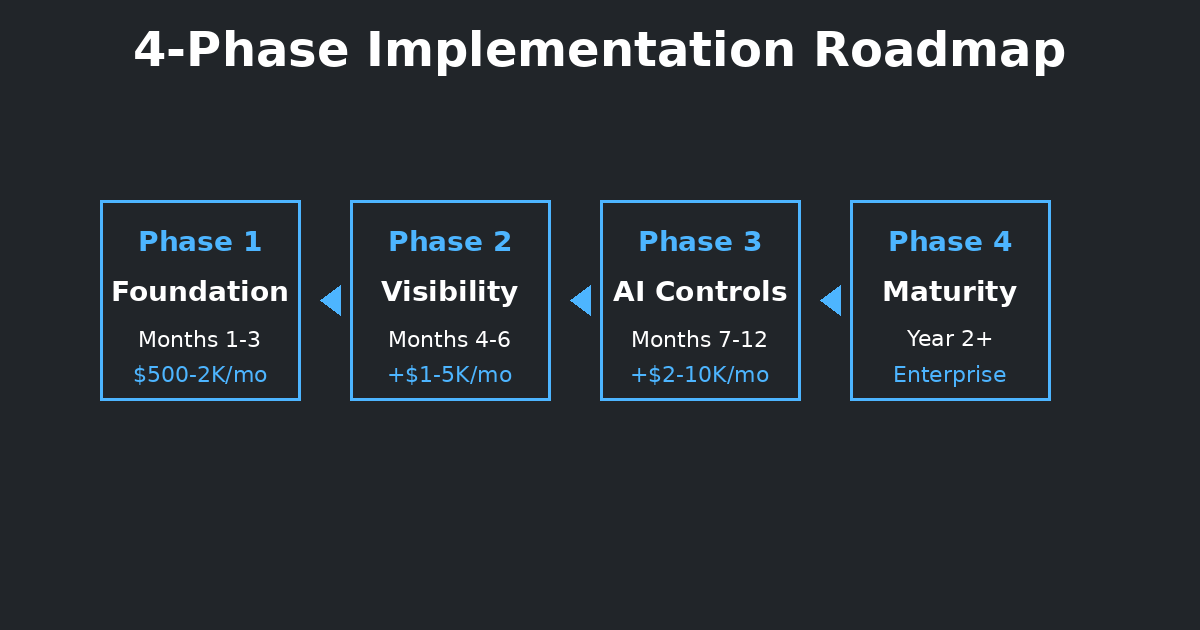
If you’re beginning your AI security tools journey, here’s my recommended prioritization:
Phase 1: Foundation (Months 1-3)
Must-have tools:
1- Strong IAM with MFA (Azure AD, Okta, or equivalent)2- Basic encryption (at rest and in transit)3- Cloud security posture management (Azure Security Center, AWS Security Hub)4- Audit logging (centralised, tamper-proof logs)
Why these first: These controls prevent the most common and damaging attacks. Master these before adding sophistication.
Budget estimate: $500-2,000/month for small deployments (many free tiers available initially)
Phase 2: Visibility (Months 4-6)
Add next:
1- SIEM or centralized logging (Azure Sentinel, ELK Stack)2- Endpoint protection (CrowdStrike, Defender)3- Network security (firewalls, segmentation)4- Basic vulnerability scanning
Why these second: Once foundation is solid, add visibility into what’s happening across your environment.
Budget estimate: Additional $1,000-5,000/month depending on scale
Phase 3: AI-Specific Controls (Months 7-12)
Add then:
1- Model monitoring (drift detection, performance tracking)2- API security (rate limiting, input validation, abuse prevention)3- Data loss prevention (particularly for training data)4- Advanced threat detection
Why these third: AI-specific security builds on a general security foundation. Don’t skip to here without completing Phase 1-2.
Budget estimate: Additional $2,000-10,000/month depending on sophistication
Phase 4: Maturity (Year 2+)
Consider adding:
1- Advanced threat hunting (proactive threat detection)2- Automated response (SOAR for well-understood scenarios)3- Adversarial testing (red teaming for AI systems)4- Advanced compliance automation
Why last: These represent security maturity, not basic protection. Invest here only after earlier phases are solid.
Final Thoughts: Tools Are Means, Not Ends
After years of managing AI security tools across four countries, one lesson stands out:
Tools don’t create security—people, processes, and culture do.
The most sophisticated SIEM won’t help if your team ignores alerts. The best EDR won’t prevent breaches if users have weak passwords. The most advanced ML monitoring won’t catch drift if nobody reviews the dashboards.

My approach:
- Start with clear security goals (what are you protecting, from whom, why?)
- Choose tools that support those goals (not tools that look impressive)
- Implement tools your team can actually operate (sophistication means nothing if tools aren’t used)
- Measure outcomes, not tool deployment (are you actually more secure?)
The tools in this pillar work. I’ve deployed them, troubleshot them, and relied on them in production healthcare environments where failures could harm patients. But they worked because we:
- Chose tools appropriate for our context
- Trained teams to use them effectively
- Integrated them into workflows
- Monitored whether they actually reduced risk
Your tool choices will differ from mine. You may have better infrastructure, larger budgets, different regulatory requirements, or different risk profiles. That’s fine use my framework and experiences as a starting point, then adapt to your reality.
The goal isn’t to replicate my tool stack. The goal is to understand how to evaluate tools critically, implement them practically, and operate them effectively.
That’s what this pillar provides: not a shopping list, but a framework for making intelligent tool choices in your specific context.